> ## Documentation Index
> Fetch the complete documentation index at: https://docs.vcms.io/llms.txt
> Use this file to discover all available pages before exploring further.
# Camperest
> Check the following before connecting Camperest.
***
## Things to watch
### You need your Camperest campsite ID
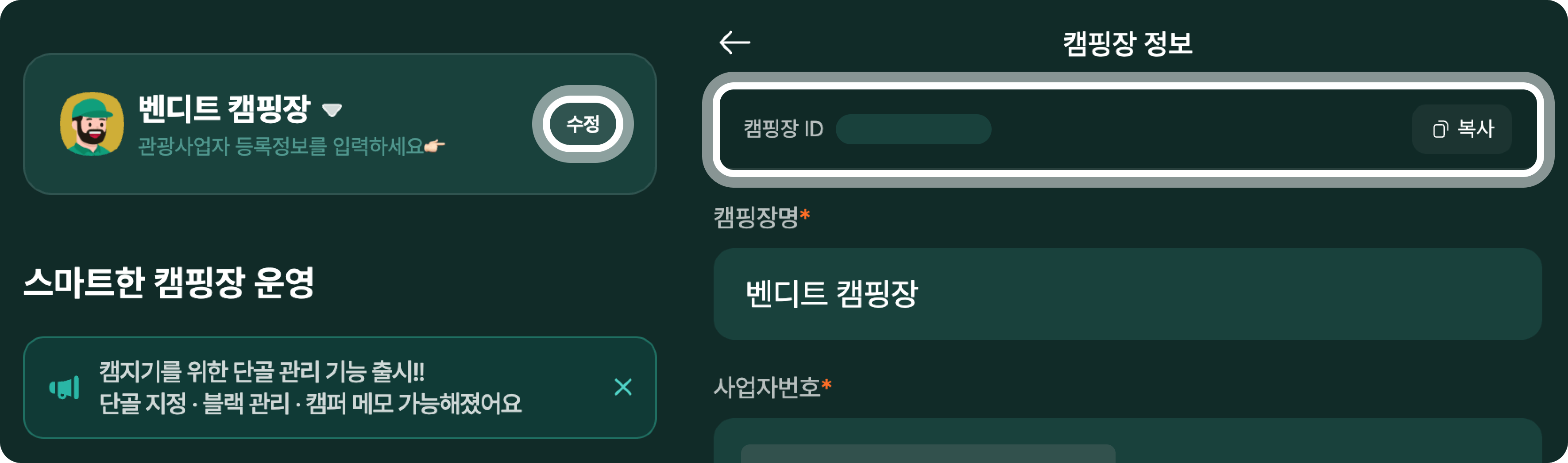 The campsite ID is on the \[Campsite information] screen of the Camperest campsite manager service.
***
### Set rates on Camperest directly
Camperest rates cannot be adjusted from VCMS. Use it for inventory and booking sync, and set and manage rates on the Camperest channel itself.
Change the rate of a Camperest package in VCMS and nothing reaches the channel.\
When a rate has to change, change it on Camperest.
The campsite ID is on the \[Campsite information] screen of the Camperest campsite manager service.
***
### Set rates on Camperest directly
Camperest rates cannot be adjusted from VCMS. Use it for inventory and booking sync, and set and manage rates on the Camperest channel itself.
Change the rate of a Camperest package in VCMS and nothing reaches the channel.\
When a rate has to change, change it on Camperest.