> ## Documentation Index
> Fetch the complete documentation index at: https://docs.vcms.io/llms.txt
> Use this file to discover all available pages before exploring further.
# Liveanywhere
> Check the following before connecting Liveanywhere.
***
## Things to watch
### **Social login accounts cannot connect**
A Liveanywhere account signed up through social login cannot connect to VCMS. Use a phone number or email account.
***
### Set rates on Liveanywhere directly
VCMS cannot adjust Liveanywhere rates. Use it for inventory and booking sync, and set and manage rates on the channel itself.
Change the rate of a Liveanywhere package in VCMS and nothing reaches the channel.\
When a rate has to change, change it on Liveanywhere.
***
### Liveanywhere runs on rental contracts
Unlike ordinary accommodation bookings, Liveanywhere works in **6-night or 30-night rental contracts**. What syncs is the contract, not an individual guest's booking.
Booking information appears per rental contract rather than per guest.
***
### Closing single dates can trigger a minimum-nights shortfall
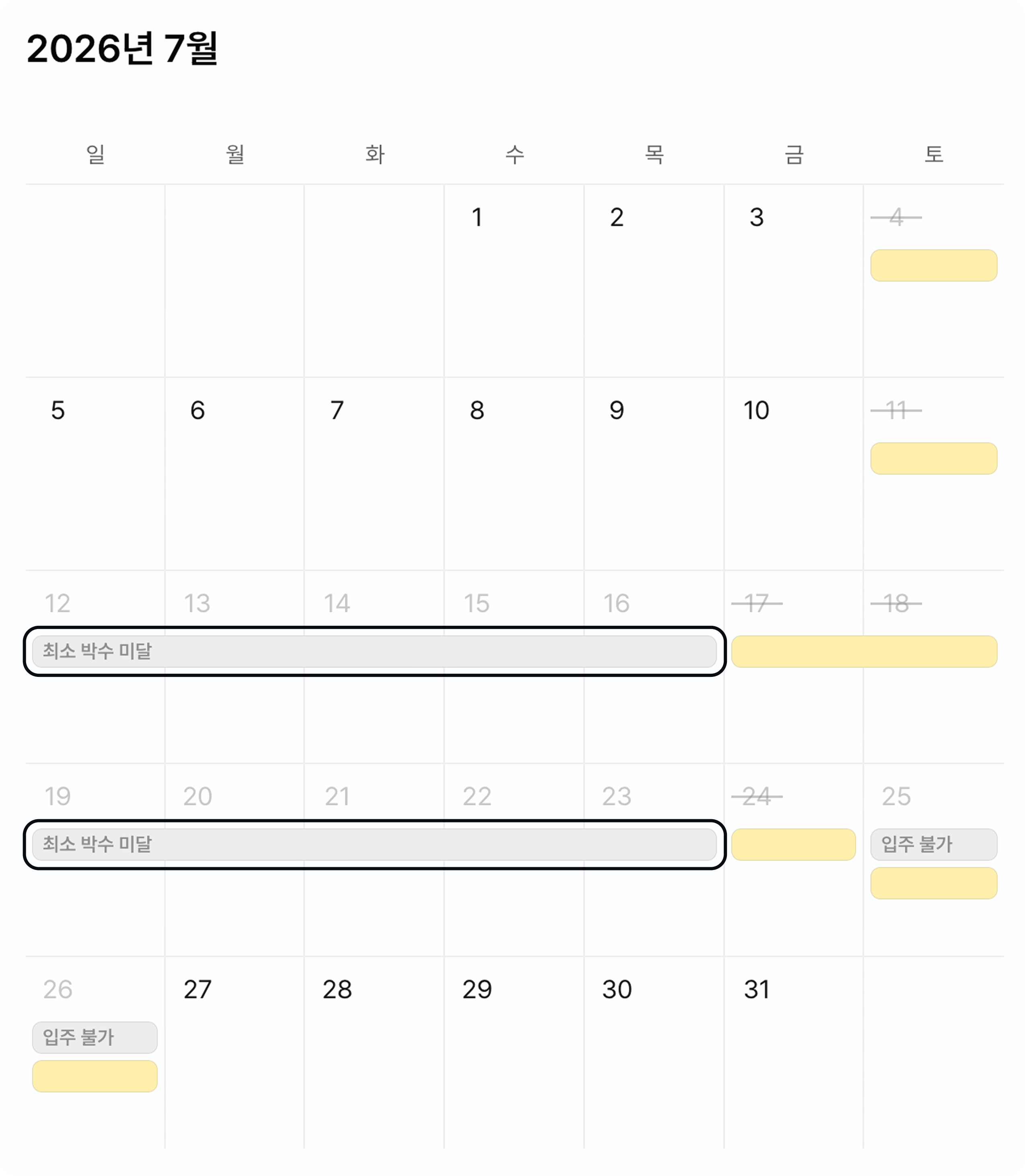 Close individual dates and the dates between them can show as unbookable for **falling short of the minimum nights**. Close the 13th and the 15th, for instance, and the 14th in between is blocked.