> ## Documentation Index
> Fetch the complete documentation index at: https://docs.vcms.io/llms.txt
> Use this file to discover all available pages before exploring further.
# Jun 17, 2026
> Hello from Vendit. Here is what changed in VCMS in the third week of June.
***
> **Highlights**\
> "Sell rooms in bundles and inventory still draws down correctly. Set units per booking."\
> "Rate entry is easier. Apply rate periods in one pass and preview the result."\
> "Change a room type and the connected packages adjust themselves."
## **New**
### One booking can draw down several units of inventory
> For properties selling several rooms as one package, capsules for instance
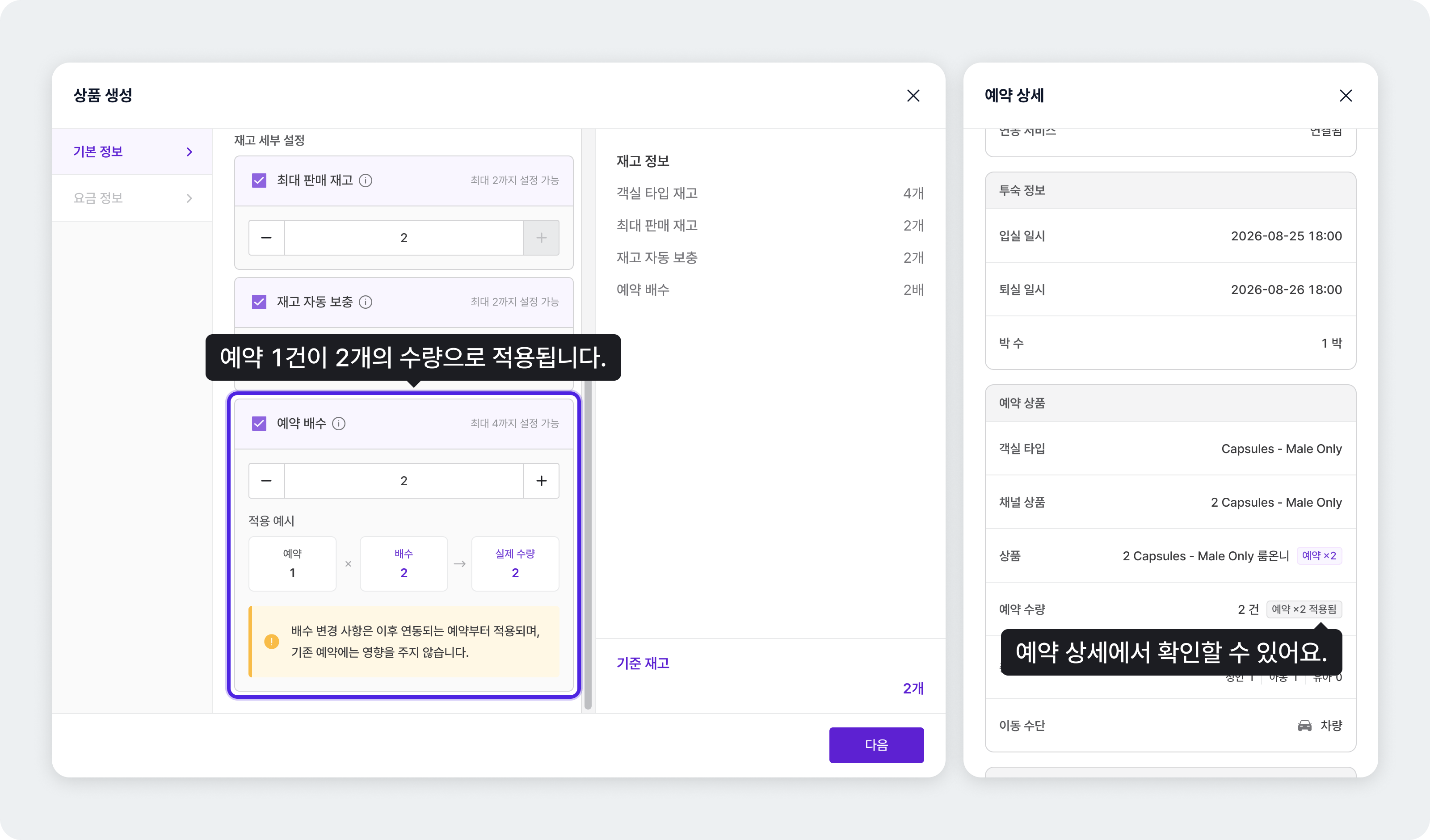 Set units per booking on a package and each booking draws down that many units of inventory.
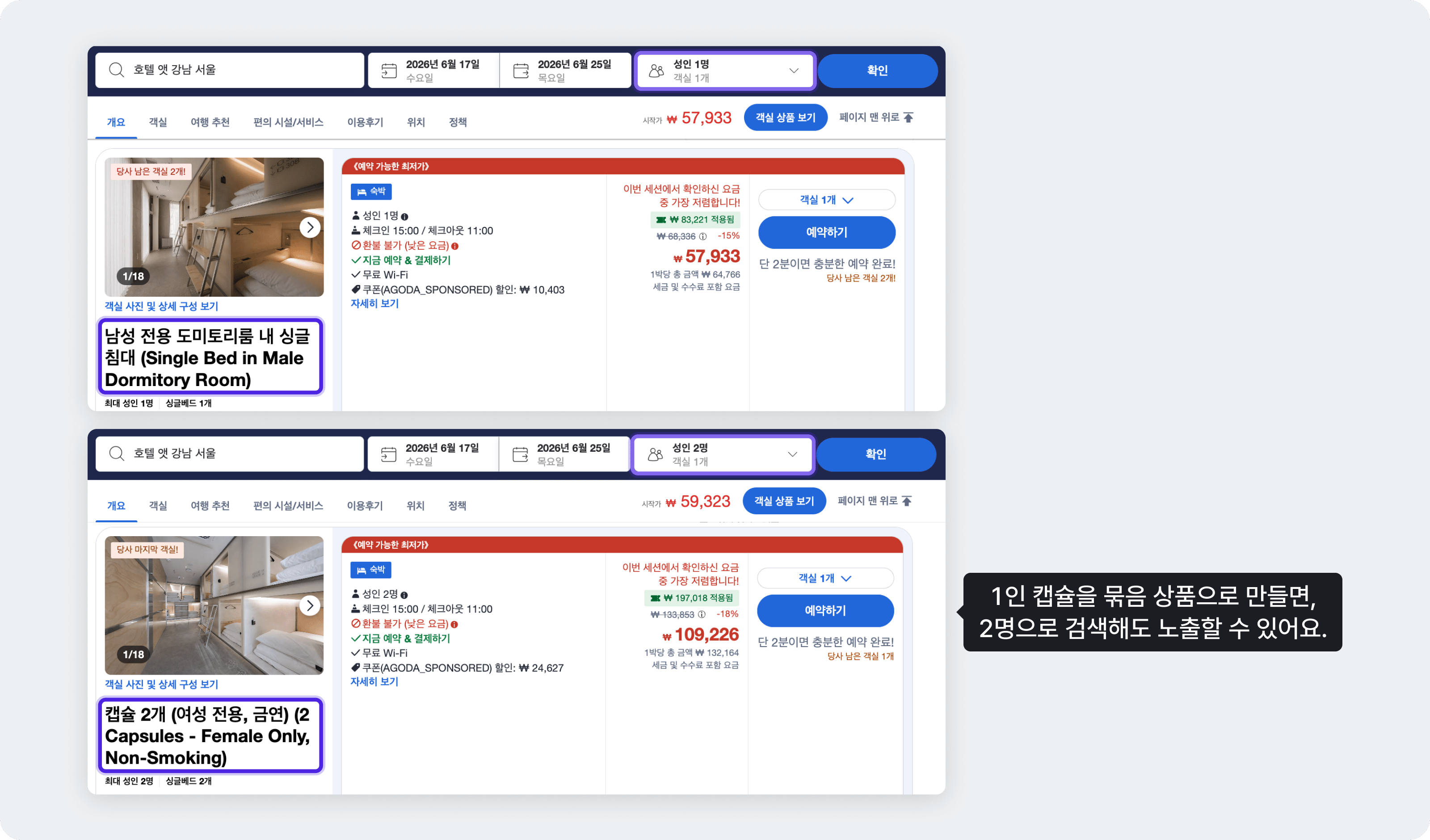
In a capsule hotel, one capsule sleeps one person, so two people travelling together need two capsules. Set units per booking to 2 on a "2 capsules" bundle and the bundle appears when the guest selects 2 people, with each booking drawing 2 capsules from inventory. Guests see the package that fits their party size, and your inventory stays accurate.
Set units per booking on a package and each booking draws down that many units of inventory.
In a capsule hotel, one capsule sleeps one person, so two people travelling together need two capsules. Set units per booking to 2 on a "2 capsules" bundle and the bundle appears when the guest selects 2 people, with each booking drawing 2 capsules from inventory. Guests see the package that fits their party size, and your inventory stays accurate.
 **More detail**
* How: \[Settings] - \[Packages], set units per booking
* A units-per-booking badge appears on Distribution, packages, booking details, and channel package linking, and availability is calculated against it.
* Linking a channel package to a units-per-booking package goes through a confirmation dialog.
* Booking details and channel package mapping work on mobile too.
* The [guide](https://docs.vcms.io/en/inventory-rate/package-stay) covers the cases in full.
A change to units per booking applies from the moment you set it. Existing packages are untouched.
***
## **Improved**
### Rate setting is much easier
> For properties adjusting rates by period and season often
**More detail**
* How: \[Settings] - \[Packages], set units per booking
* A units-per-booking badge appears on Distribution, packages, booking details, and channel package linking, and availability is calculated against it.
* Linking a channel package to a units-per-booking package goes through a confirmation dialog.
* Booking details and channel package mapping work on mobile too.
* The [guide](https://docs.vcms.io/en/inventory-rate/package-stay) covers the cases in full.
A change to units per booking applies from the moment you set it. Existing packages are untouched.
***
## **Improved**
### Rate setting is much easier
> For properties adjusting rates by period and season often
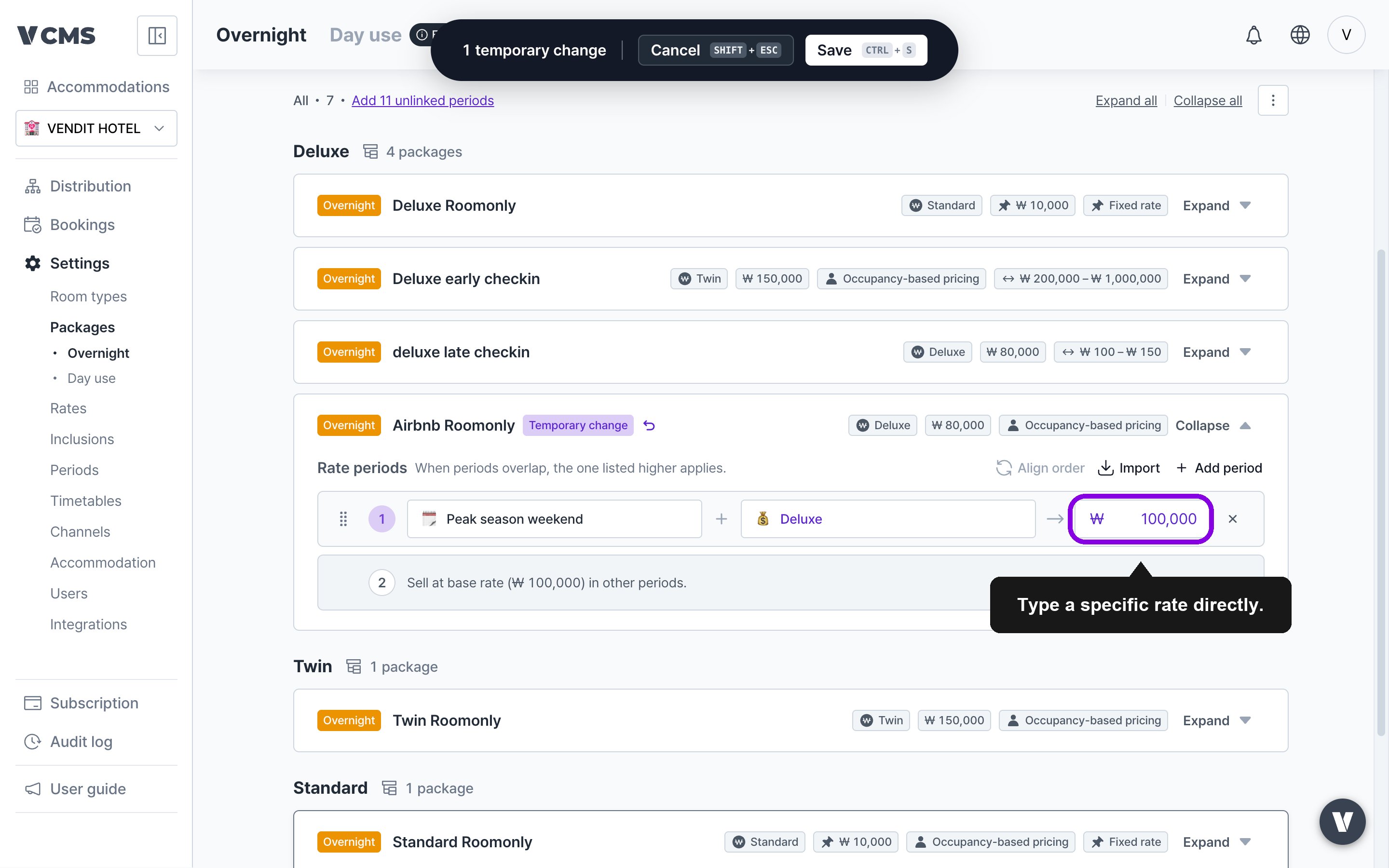 Changing a package rate can now apply to its rate periods in one pass. Rates can be typed in directly, and decimal places are handled correctly per currency.
**More detail**
* In \[Packages] - \[Rate information], a rate change can be applied to rate periods in bulk.
* Editing a package rate shows a before-and-after preview dialog.
* The [guide](https://docs.vcms.io/en/inventory-rate/package-stay) covers the cases in full.
***
### Change a room type and connected packages adjust themselves
> For properties that change room composition often, or run many packages
Changing a package rate can now apply to its rate periods in one pass. Rates can be typed in directly, and decimal places are handled correctly per currency.
**More detail**
* In \[Packages] - \[Rate information], a rate change can be applied to rate periods in bulk.
* Editing a package rate shows a before-and-after preview dialog.
* The [guide](https://docs.vcms.io/en/inventory-rate/package-stay) covers the cases in full.
***
### Change a room type and connected packages adjust themselves
> For properties that change room composition often, or run many packages
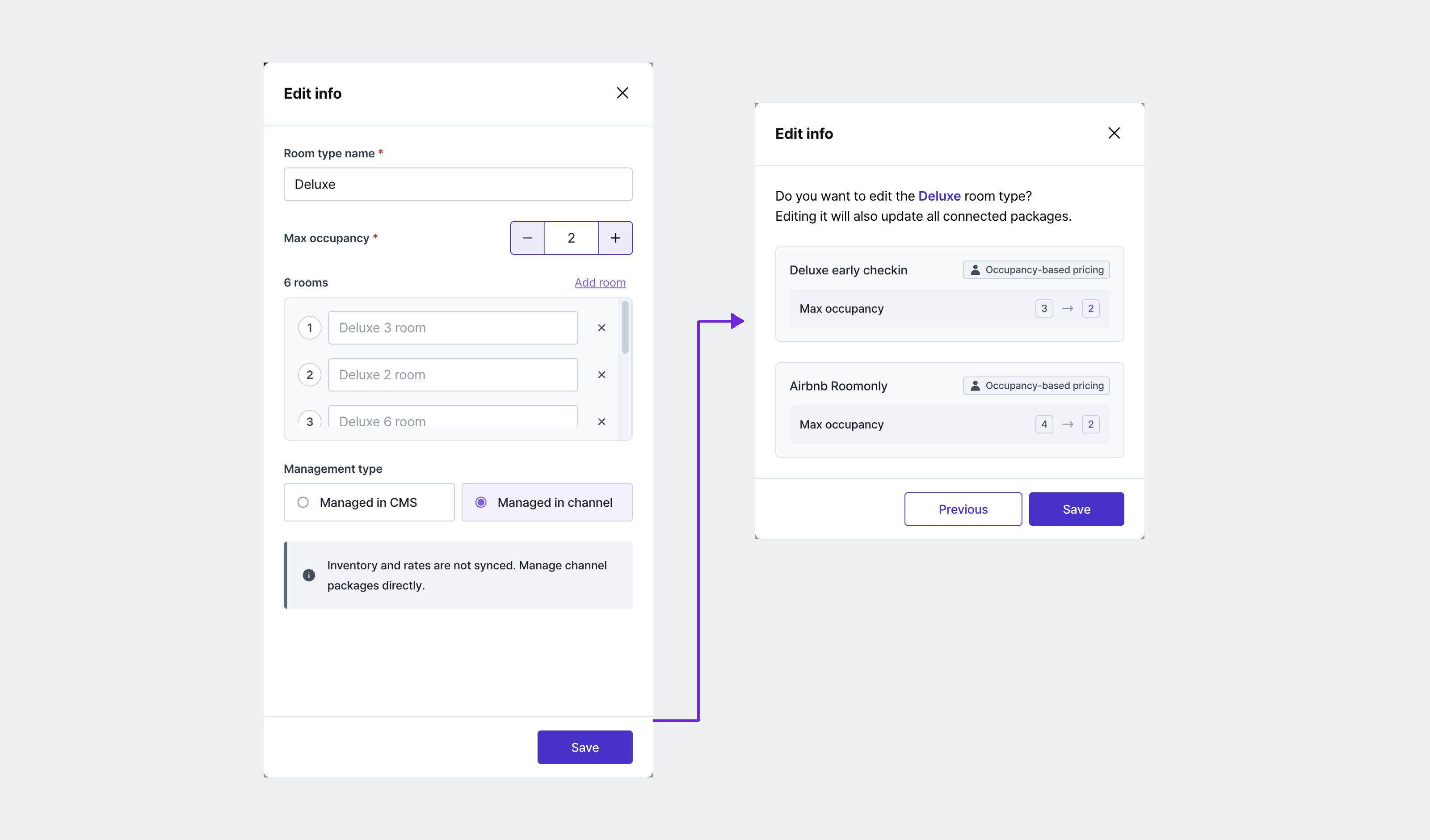 Edit or delete a room type, or change its max occupancy, and the connected packages' max inventory, auto top-up, units per booking, and occupancy settings are pulled back into the allowed range automatically. When a value has to move, a confirmation dialog tells you first.
***
### Booking details are grouped and easier to read
Edit or delete a room type, or change its max occupancy, and the connected packages' max inventory, auto top-up, units per booking, and occupancy settings are pulled back into the allowed range automatically. When a value has to move, a confirmation dialog tells you first.
***
### Booking details are grouped and easier to read
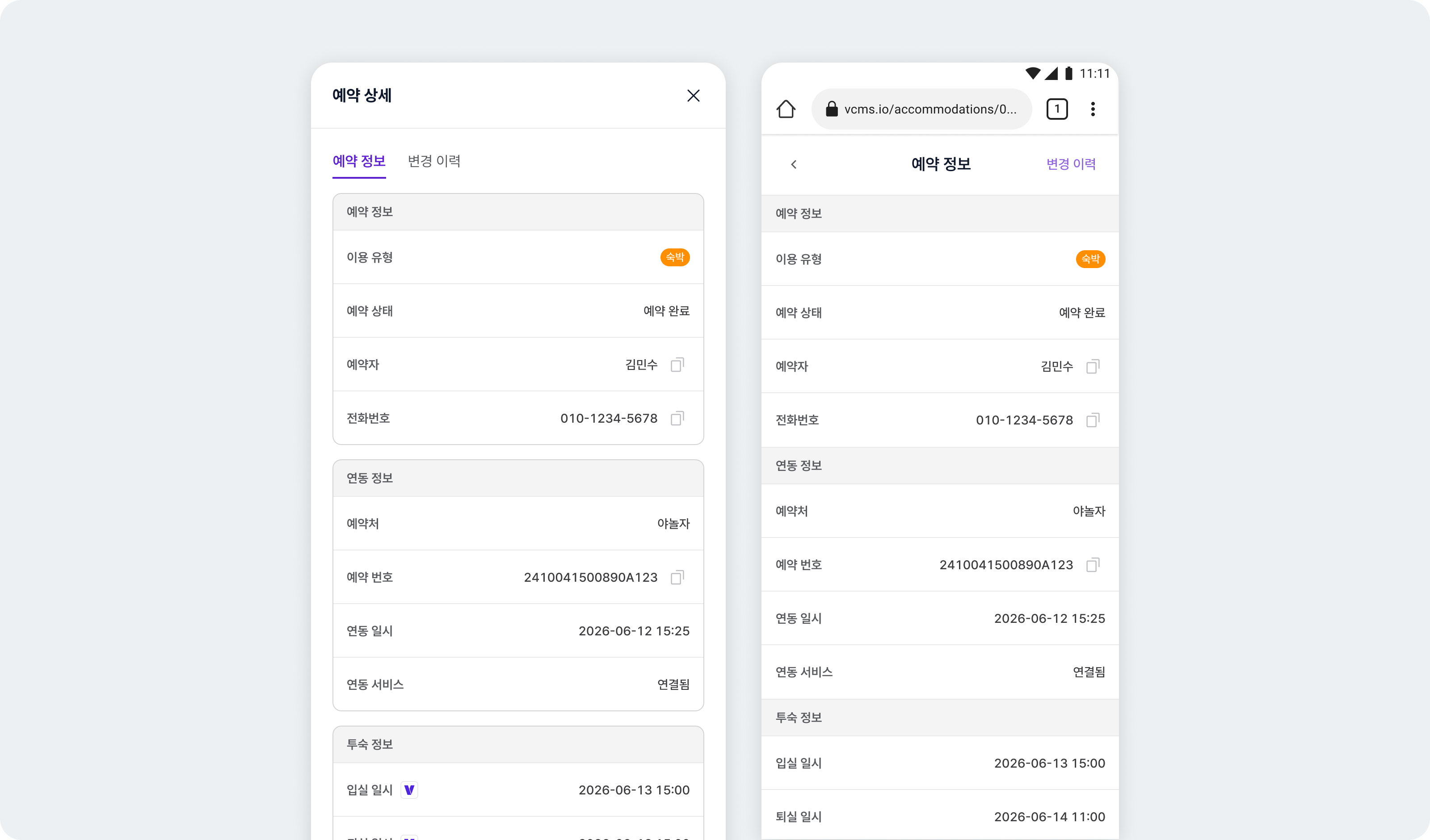 The booking detail dialog groups information by topic, so what you need is easier to find. Mobile gets the same layout.
***
## **Fixes**
* Fixed borders and background corners misaligning on the Distribution table.
* Airbnb: fixed the adjustment handle not appearing after a rate change on a channel package with max inventory of 1.
* Fixed the bulk update dialog opening wrongly when dragging sell status across weekdays excluded in view settings.
The booking detail dialog groups information by topic, so what you need is easier to find. Mobile gets the same layout.
***
## **Fixes**
* Fixed borders and background corners misaligning on the Distribution table.
* Airbnb: fixed the adjustment handle not appearing after a rate change on a channel package with max inventory of 1.
* Fixed the bulk update dialog opening wrongly when dragging sell status across weekdays excluded in view settings.