Things to watch with the Ddnayodotcom integration
An Accommodation PC is required for two-factor authentication
Ddnayodotcom puts the integration through two-factor authentication, so the property needs an Accommodation PC. Without one, the Ddnayodotcom integration is hard to use.Multi-night bookings arrive split into single nights
Book several nights on Ddnayodotcom and VCMS receives that booking split night by night into several bookings. A 3-night booking becomes 3 bookings, a 15-night booking becomes 15.Ddnayodotcom sometimes bundles separate bookings into one. That can make the night count come out wrong, so VCMS splits Ddnayodotcom bookings into single nights. This way, inventory stays accurate even when part of a booking changes or is canceled.
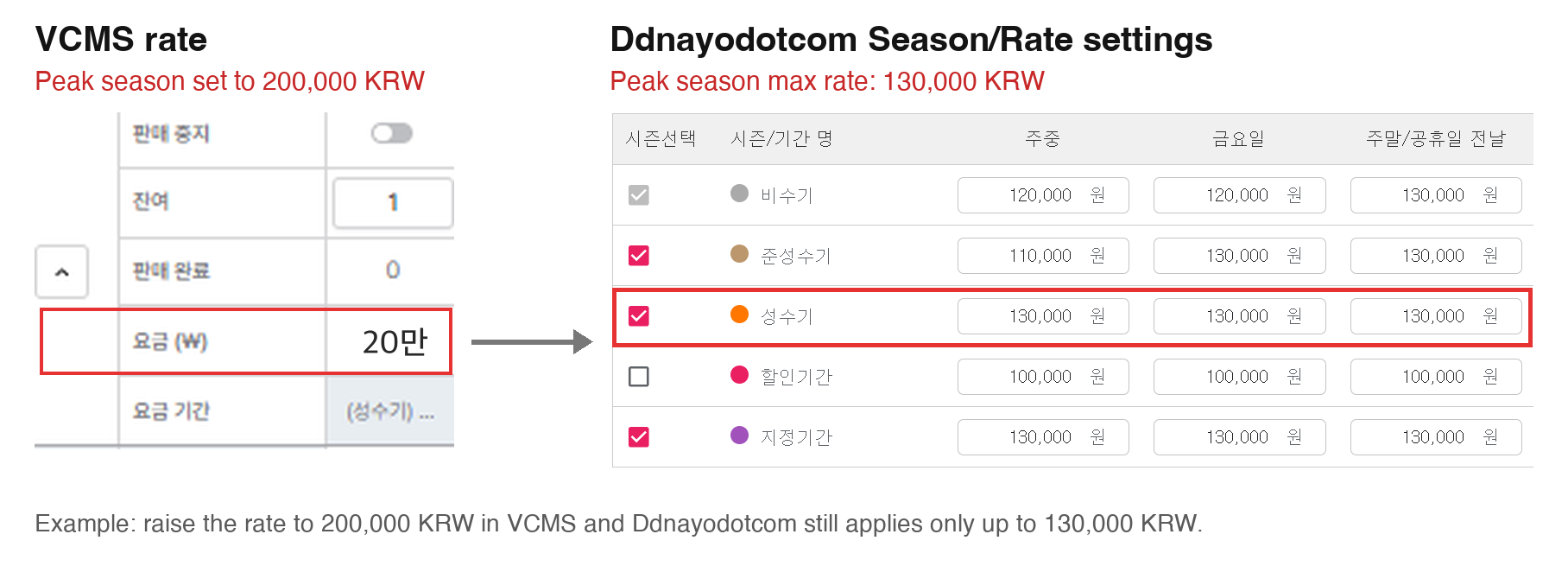
Rates cannot go above the amount in Ddnayodotcom’s Season/Rate settings
Ddnayodotcom treats the amount in its Season/Rate settings as the maximum rate (cap) for that period, and applies discount rates within it. If you raise a rate in VCMS above that amount, it is not applied on Ddnayodotcom, and the two screens can show different rates. For example, if peak season is 130,000 KRW in Ddnayodotcom’s Season/Rate settings, raising the peak-season rate to 200,000 KRW in VCMS is applied on Ddnayodotcom only up to 130,000 KRW.